

November 30, 2023
Creating lessons? Your new digital assistant Tessa does it in 2 minutes
As a teacher, are you also regularly short on time? No worries: Tessa, Prowise's brand new digital assistant, will be by your side from now on to reduce your workload.
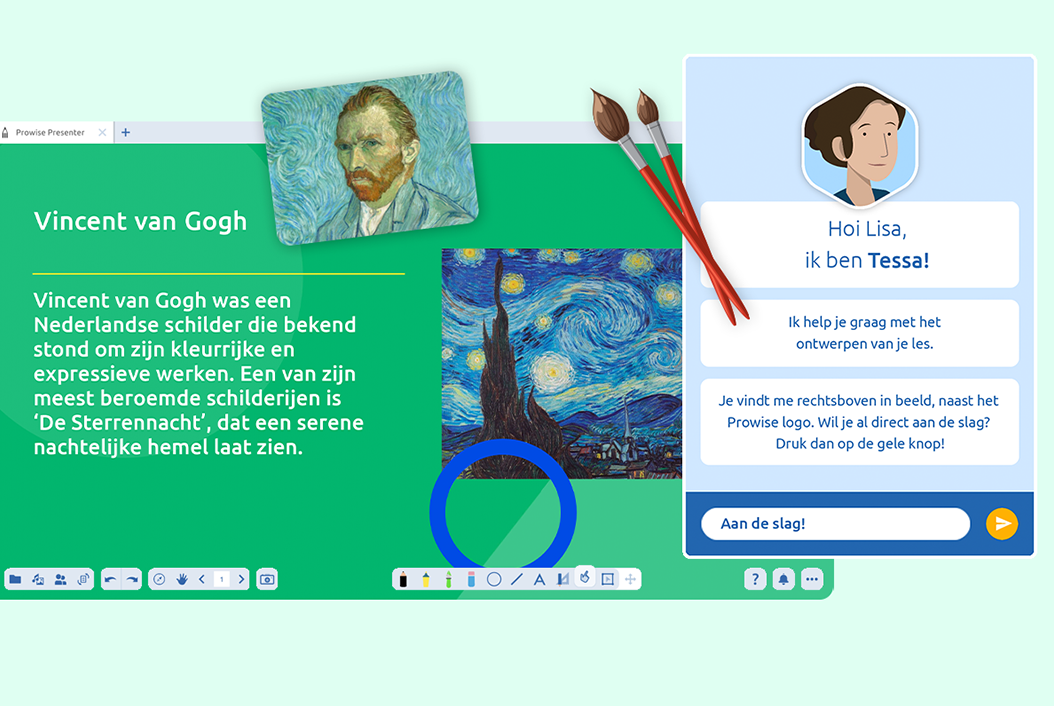
As a teacher, are you also regularly short on time? No worries: Tessa, Prowise’s brand new digital assistant, will be by your side from now on to reduce your workload. This innovative AI tool from Prowise only needs five questions and two minutes to develop a custom-made lesson, from A to Z. That way, you no longer have to spend hours preparing your lessons and can focus on what actually matters: Teaching engaging and interactive lessons to your students!
How does Tessa work?
You can activate Tessa with one simple click in Prowise Presenter, the free whiteboard software from Prowise. Tessa then asks about things like the topic, the target audience and the desired number of pages of the lesson. She also asks if you want a preferred template and specific content elements, such as images, quizzes, practice questions, mind maps and word clouds. Tessa then comes up with a full lesson within a few minutes. Give it a quick check and you are ready to start your lesson! Moreover, your lesson is already saved with your personal files – so it is easy to retrieve.
Easily preparing lessons
Tessa was developed specifically to make it as easy as possible for teachers. IT skills are therefore not a requirement to get started with the tool. On the contrary: as soon as you ask for Tessa’s help, your user-friendly assistant immediately takes you by the hand and the rest is self-explanatory. Do you still have questions or feedback? Feel free to let us know: based on user feedback, we will optimise the beta version of Tessa in the coming period.
Get started with Tessa
Do you want to get started with Tessa? You can find Tessa via the splash screen or in the top-right corner of Presenter, next to the Prowise logo. Currently, this new tool is not automatically enabled in Prowise Presenter. If you have a teacher account that is part of a school package, you should first contact your school’s package manager. That person will be able to manually activate Tessa in the administration module. During Tessa’s beta period, students do not have access to this module.
Related Posts
After Bundeswehr, ProVitako and KDN also choose Prowise
ProVitako Chooses Prowise Again